Apollo Lander
Fly the Apollo 11 descent in a software-in-the-loop Monte Carlo campaign, then calibrate it against real telemetry.
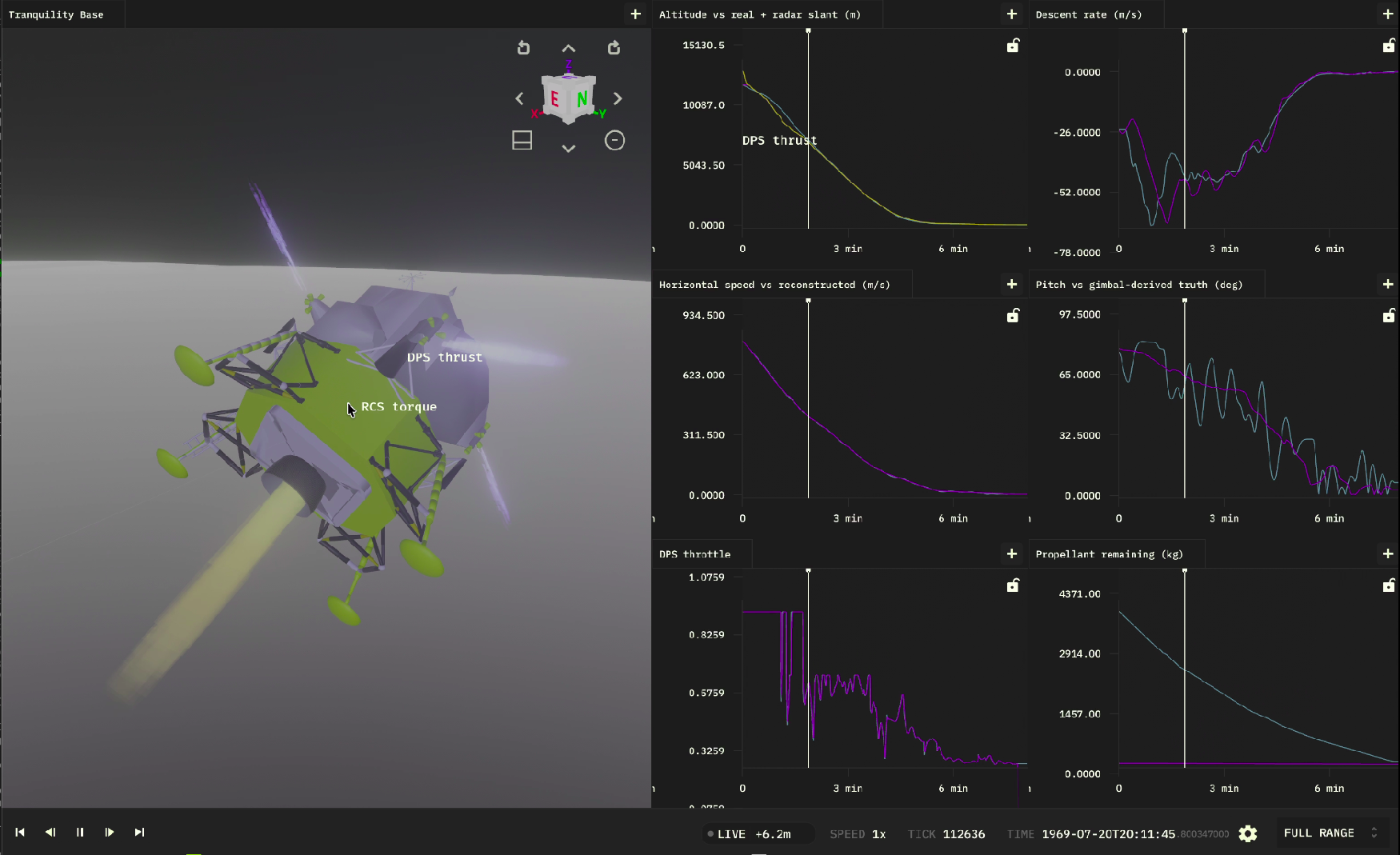
The bouncing-ball and three-body tutorials build a simulation and watch it run. Real
aerospace work asks a harder question: does my actual flight software land the
vehicle, across every dispersion it might see on the day? This tutorial answers it
with the examples/apollo-lander
example, which picks up Apollo 11 at landing-radar lock-on (~12 km up, still carrying
~800 m/s of orbital velocity) and flies the braking burn, pitchover, and touchdown
with an external Lunar Guidance Computer (LGC) in the loop.
In this tutorial you'll learn to:
- Declare a simulation's tunable parameters for Monte Carlo
- Run ordinary Python in a
post_stepcallback to drive a live flight-software process over a socket (software-in-the-loop) - Launch and manage that process per run, with each parallel worker isolated
- Run a Monte Carlo campaign, score each run, and read an aggregated report
- Calibrate the model against real telemetry by narrowing parameter ranges
Rather than re-typing the whole example, we'll tour its key pieces and run them.
This tutorial assumes you've installed the Elodin CLI and Python SDK (see the Quick Start) and cloned the repo. We'll run everything from the repository root.
The big picture
A Monte Carlo SITL campaign has three moving parts:
- The simulation (
sim.py): a 6-DOF lunar lander whose physics — gravity, the descent engine, RCS attitude control, and propellant burn-down — runs as JAX systems. It also replays the real Apollo descent on a "truth ghost" so you can compare against it. - The flight software (
controller/): a small Rust LGC that receives telemetry and sends back throttle and attitude commands, exactly like the real guidance computer. The simulation talks to it over UDP. - The campaign runner (
elodin monte-carlo): it samples a set of parameters, then fans the runs out across parallel workers. Each worker runs one descent — its own sim, its own controller, its own ports — and a pair of hooks score the runs and write a report.
spec.toml ──sample──▶ runner ──┬─▶ worker 1: sim ◀──UDP──▶ LGC ─┐
                               ├─▶ worker 2: sim ◀──UDP──▶ LGC ─┤─▶ score.py ─▶ report.py
                               └─▶ worker N: sim ◀──UDP──▶ LGC ─┘
Run it first
Clone the repo and launch the campaign from the repository root:
git clone https://github.com/elodin-sys/elodin.git && cd elodin

elodin monte-carlo run examples/apollo-lander/main.py \
  --campaign examples/apollo-lander/campaign.toml \
  --spec examples/apollo-lander/spec.toml \
  --out dbs/apollo-lander-demo
The runner builds the Rust controller once, samples 30 descents, and runs them in
parallel (a few minutes on a laptop). When it finishes, it prints — and writes to
dbs/apollo-lander-demo/post_campaign/apollo_lander_report.txt — a summary like:
Apollo 11 lander Monte Carlo report
====================================

runs completed: 30/30
soft landings: 27/30
success rate: 90.000%

Vertical touchdown speed
  mean: 1.471 m/s
  p95:  2.640 m/s
  max:  2.880 m/s

Landing dispersion (downrange miss from site)
  mean: 38.512 m
  p95:  94.000 m
  max:  121.880 m

Apollo telemetry fit
  best run: run-00017
  best altitude RMSE: 41.220 m
  mean pitch RMSE: 9.840 deg
  ...

Calibration hint
  Narrow spec.toml ranges around the best-fit params and re-run, or use
  calibrate.py for the optional automated loop.
Your exact numbers will vary, but you now have a working SITL campaign. The rest of the tutorial explains how each piece produced that report.
A guided tour of the pieces
Declare tunable parameters
A Monte Carlo campaign varies parameters. The simulation declares the ones it
exposes with el.monte_carlo.params_spec(...) — each Param has a default and,
optionally, a min/max range (sim.py, abbreviated to 3 of its 17):
PARAMS = el.monte_carlo.params_spec(
    init_altitude_m=el.monte_carlo.Param(float, default=11_800.0, min=11_650.0, max=11_950.0),
    init_pitch_deg=el.monte_carlo.Param(float, default=-77.0, min=-80.0, max=-70.0),
    propellant_kg=el.monte_carlo.Param(float, default=3_950.0, min=3_800.0, max=4_200.0),
    # ... 14 more: masses, gains, thrust scale, gravity, Isp ...
)
At runtime the sim reads the current row of sampled values with one call:
params = el.monte_carlo.params(PARAMS)
init_altitude = float(params.get("init_altitude_m"))
This single declaration does double duty: the runner samples it, and
elodin monte-carlo quickstart reads it to scaffold a spec.toml for you. Params
with bounds become uniform variables; the rest are held fixed.
The simulation, in brief
sim.py exposes a build(params) function that returns (world, system): a 6-DOF
lander with lunar gravity, a throttleable descent engine, RCS torque, and a
mass-burn system, plus a kinematic truth ghost that replays the recorded Apollo
descent every tick. Authoring physics systems is covered in the
Bouncing Ball and Three-Body tutorials, so we
won't dwell on it here.
The important distinction for SITL is this: the deterministic physics runs as JAX
systems, but everything that talks to the outside world happens in a post_step
callback — plain Python that runs after each tick.
Run real Python every tick: post_step and StepContext
world.run(..., post_step=fn) calls your function after each simulation tick (and
pre_step=fn before it). Your callback receives the tick number and a
StepContext, which gives you direct read/write access to the simulation database.
Crucially, this is normal Python, not JAX — so you can open sockets, call
libraries, and manage state across ticks.
The Apollo example uses exactly this to drive the live controller (main.py,
abbreviated):
def post_step(tick: int, ctx: el.StepContext) -> None:
    # Read the latest kinematics straight from the simulation database.
    reads = ctx.component_batch_operation(
        reads=["lander.world_pos", "lander.world_vel", "lander.altitude",
               "lander.vertical_speed", "lander.propellant"]
    )
    altitude = float(reads["lander.altitude"][0])
    # ... assemble `state` from the readings and the reference profile ...

    # Ordinary Python: open the UDP socket once, then trade packets with the
    # live flight-software process.
    global bridge
    if bridge is None:
        bridge = SitlBridge(last_throttle, last_attitude)
    last_throttle, last_attitude, _ = bridge.step(state)

    # Write the commands back into the sim.
    ctx.component_batch_operation(
        writes={
            "lander.throttle_cmd": np.array([last_throttle]),
            "lander.attitude_setpoint": np.array(last_attitude),
        }
    )
StepContext also offers single-component read_component / write_component and
the current ctx.tick / ctx.timestamp; component_batch_operation just does many
reads and writes under one database lock.
But how do externally-written commands survive the next physics tick? The components
the controller drives are tagged as externally controlled (sim.py):
ThrottleCmd = ty.Annotated[
    jax.Array,
    el.Component("throttle_cmd", el.ComponentType(el.PrimitiveType.F64, (1,)),
                 metadata={"external_control": "true"}),
]
external_control is the contract between the simulation and the outside world: JAX
systems may read these components but never overwrite them, so the value your
callback (or any external client) writes is the value the physics sees. See the
StepContext reference for the
full API and the external_control metadata.
Why software-in-the-loop?
You could approximate the guidance law inside a JAX system. SITL does something more valuable: it flies your actual flight software — the same code that will run on the vehicle — so the campaign exercises the real guidance and control logic, its real timing and lockstep behavior, and the simulation-to-software integration boundary, across every Monte Carlo dispersion. Bugs that only appear in the real code — numerical edge cases, message framing, off-by-one timing — surface here, in simulation, before they reach hardware.
Ways to connect your flight software
The post_step bridge is one option of several. Pick based on where your software
runs:
- In-process bridge via
post_step/pre_step+StepContext(sockets or IPC you open yourself) — what this example does. Lockstep, lowest latency, same process. - A managed external process via
world.recipe(...)— Elodin launches and tears down the real flight-software binary alongside the sim (covered next). - A networked client over the Impeller protocol talking to
elodin-db: any external program — or hardware-in-the-loop rig — reads sensor components and writesexternal_controlcommands without an in-process bridge.
The flight-software process: an s10 recipe with named ports
The example launches the Rust LGC as a managed process with world.recipe(...)
(main.py):
controller = el.s10.PyRecipe.cargo(
    name="Apollo LGC",
    path=str(controller_dir),
    ready=el.s10.Ready.delay(100),   # give it 100 ms to come up
    ready_timeout="1s",
)
world.recipe(controller)
The ready probe gates startup until the process is up; richer probes (tcp,
unix, file, log) and depends_on let you orchestrate multi-process stacks
(see Process Orchestration (s10)).
For the sim and controller to find each other — without colliding when 8 workers run
at once — the example uses named ports instead of hardcoded numbers (main.py):
self.state_port = el.monte_carlo.port("state", DEFAULT_STATE_PORT)
self.command_port = el.monte_carlo.port("command", DEFAULT_COMMAND_PORT)
el.monte_carlo.port("state", 9013) returns the default outside a campaign, but
inside one the runner hands each worker its own offset slot, so parallel runs never
fight over the same UDP port. The controller reads the matching values from
ELODIN_MC_PORT_STATE / ELODIN_MC_PORT_COMMAND env vars.
The campaign config
campaign.toml wires the whole campaign together — it's only ~20 lines:
timeout = "120s"
retries = 0
continue_on_error = true

[[build]]
command = "cargo"
args = ["build", "--release", "--manifest-path", "examples/apollo-lander/controller/Cargo.toml"]

[resources]
port_stride = 40
db_port = 2240

[resources.ports]
state = 9013
command = 9012

[retention]
keep_run_db = "on-fail"

[hooks]
post_run = "examples/apollo-lander/hooks/score.py"
post_campaign = "examples/apollo-lander/hooks/report.py"
Each [[build]] step runs once before any worker starts (and fails the campaign if
it can't). [resources] declares the named ports and the port_stride between
workers — the whole plan is validated for every worker before anything launches, and
a port can also be "auto" to have the runner allocate it dynamically per run.
[retention] keep_run_db = "on-fail" keeps only failing runs' databases so a big
campaign doesn't fill your disk. [hooks] points at the two Python lifecycle hooks.
Add workers = N to pin concurrency (the default sizes itself from CPU cores).
The sampling spec
spec.toml says how to sample those parameters into concrete runs:
[monte_carlo]
n_samples = 30
seed = 19690720
method = "lhs"

[monte_carlo.variables]
init_altitude_m = { dist = "uniform", min = 11650.0, max = 11950.0 }
init_pitch_deg = { dist = "uniform", min = -80.0, max = -70.0 }
propellant_kg = { dist = "uniform", min = 3800.0, max = 4200.0 }
# ... one line per variable ...
method = "lhs" is Latin Hypercube Sampling — it spreads samples more evenly across
the ranges than independent random draws. The fixed seed makes the whole campaign
reproducible: rerun it and you get the same 30 descents.
Scoring each run
When a run finishes, the sim emits its outcome scalars with
el.monte_carlo.result(...), which the runner writes to result.json. The
post_run hook then reads that file and returns a verdict (hooks/score.py,
abbreviated):
def post_run(ctx):
    result = read_json(Path(ctx.run_dir) / "result.json")
    passed = soft_landing(result, result)
    return {
        "valid": bool(result),        # did the run produce a result at all?
        "pass": passed,               # did it meet the soft-landing criteria?
        "touchdown_speed_mps": to_float(result.get("touchdown_speed"), float("inf")),
        "downrange_miss_m": to_float(result.get("downrange_miss"), float("inf")),
        "traj_rmse_m": to_float(result.get("traj_rmse"), float("inf")),
        # ...
    }
Runs are tri-state. pass / fail answers "did it land softly?", while valid is
about the run itself: a crash, timeout, or missing result is invalid and is
excluded from the pass/fail rate rather than counted as a failure. Every scalar you
return becomes a column in results.csv and is automatically aggregated (mean, p95,
…) for the report.
Reporting
The post_campaign hook (hooks/report.py) runs once at the end. It reads
results.csv, picks the best-fit run by trajectory RMSE, and writes the human report
you saw earlier. Because the runner already aggregated the per-run columns, the hook
stays short — it mostly formats numbers and names the best run.
Calibrate the model
Here's the payoff, and the heart of the Monte Carlo workflow: use the results to make the model match reality. The manual loop is:
- Run the campaign.
- Open
post_campaign/apollo_lander_report.txtand find the best-fit run and its parameters. - Narrow the matching ranges in
spec.tomlaround those values. - Run again and watch
traj_rmseanddownrange_missshrink.
For example, if the best fit favored a steeper lock-on pitch, tighten that range:
# before
init_pitch_deg = { dist = "uniform", min = -80.0, max = -70.0 }
# after — narrowed around the best-fit run
init_pitch_deg = { dist = "uniform", min = -78.0, max = -75.0 }
Each iteration encodes what you learned into the next spec — samples in, runs scored,
ranges tightened. calibrate.py automates the same loop:
python examples/apollo-lander/calibrate.py \
  --initial-out dbs/apollo-lander-demo \
  --work-dir dbs/apollo-lander-calibration \
  --rounds 2 --samples 30
Going further
You've now used every core Monte Carlo feature. A few more worth knowing:
- Run-dir hygiene:
--cleanprunes staleruns/directories, and[retention]controls which per-run databases are kept. - Robust teardown: on Linux the runner reaps each run's whole process tree (sim + controller) via cgroups, so nothing leaks between runs.
- Readiness & dependencies: beyond
Ready.delay, usetcp/unix/file/logprobes anddepends_onto sequence multi-service stacks. - File-based params: if your sim reads params from a file instead of
el.monte_carlo.params(...), configure[params_delivery]incampaign.toml. - Scaffold your own:
elodin monte-carlo quickstart path/to/main.py out/writes aspec.toml,campaign.toml, and starter hooks from your declared params. - CI gates: add a
post_campaignhook that raises when any run failed to turn a campaign into a pass/fail check.
Next Steps
Monte Carlo: the concept
Why Monte Carlo, and how Elodin runs campaigns at scale.
elodin monte-carlo CLI reference
Every campaign flag, hook, and config option.
StepContext & SITL reference
The full pre_step / post_step API and external_control metadata.